
In practice, when using poultry house ventilation equipment, we may notice that the number of fans operating at the end of the poultry house, or their operating mode, changes from time to time. What controls this? Of course, the first thing that probably comes to mind is temperature. When the temperature inside the poultry house rises or falls, the number of fans switched on and their operating time need to be increased or reduced to keep the house warm or cool it down. Changes in the number of operating fans and their operating mode are controlled by the ventilation level. So, what is a ventilation level? Imagine all the fans in the poultry house as a single electric fan, and the ventilation levels as the fan’s speed settings. This makes it easy to understand.
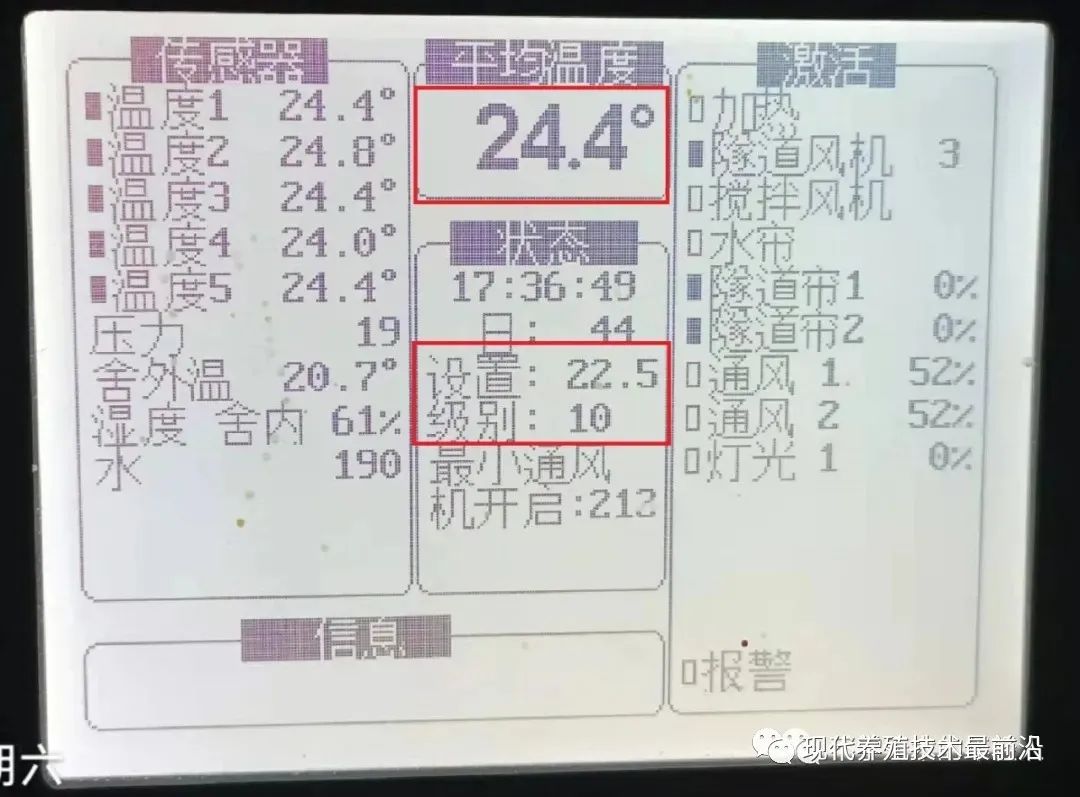
The image below shows the main screen of the AC2000 controller. The screen provides the following information:
①, the average temperature inside the house is 24.4℃,
②, the target temperature is set to 22.5℃,
③, the system is operating at ventilation level 10.
1, cross ventilation: a ventilation method that uses small windows in the poultry house walls as the main air inlets. For cross-ventilation levels, the temperature difference between each level and the target temperature must be set. During operation, the level is determined by the difference obtained by subtracting the target temperature from the average temperature.
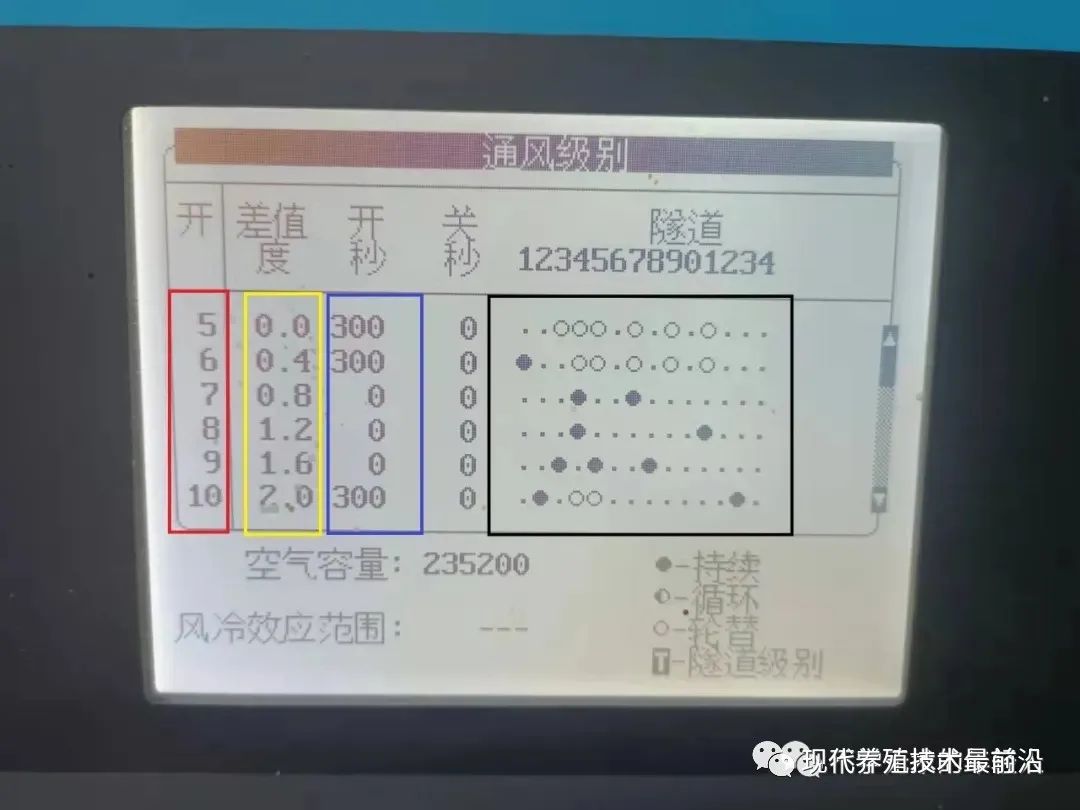
Horizontal ventilation level settings chart
The red area indicates the ventilation level:
The yellow area indicates the difference between the average temperature and the target temperature. As shown above, if the target temperature is set to 20 degrees, the controller will automatically control the ventilation level based on the difference between the average temperature and the target temperature until the average temperature reaches 20.4 degrees. When the average temperature exceeds 20.4 degrees, level 6 runs; when it exceeds 20.8 degrees, level 7 runs. Looking at the controller's main screen in the first image, some attentive readers may ask: isn't the difference for level 10 2? According to the level calculation rule, subtracting the target temperature 22.5 from the average temperature 24.4 gives a difference of 1.9, which does not reach 2. Why, then, does level 10 run? In fact, to prevent small changes in average temperature from frequently raising or lowering the operating level, the controller requires the house's average temperature to remain above or below the set temperature difference for a certain period before changing levels. This applies to both horizontal and vertical ventilation.
The green area indicates the run time and stop time (in seconds). The set times are invalid when the fan is in continuous operation mode:
The black area indicates the fan group operating mode. A group may contain one or more fans. Use the +/- keys to switch the fan operating mode. After switching the operating mode, you must press the Confirm key to confirm the setting; otherwise, it will not take effect.
Explanation of fan operating modes:
Indicates that the fans in the corresponding group are disabled. For example, at level 7, all fans except fan groups 3 and 7 do not run:
⊙ indicates alternating operation. Alternation requires at least two groups of fans to take turns running according to the set time. For example, as set for level five in the figure, 3, 4, 5, 7, 9, and 11 are used in alternation. That is, after the third fan group runs for 300 seconds, it switches to the fourth fan group, which then runs for 300 seconds. This continues until these 6 fan groups have each run for 300 seconds in turn, after which operation returns to the third group and repeats. Note that the number of fans must be the same in all fan groups used for alternating operation.
● indicates continuous operation, such as maintaining Level 7 at 3, with 7 groups of fans running continuously.
◑ indicates cyclical operation, which can cycle a single group. The cyclical operation mode repeats a cycle of running for a set period of time and then stopping for a set period of time.
T indicates longitudinal ventilation level/tunnel ventilation.
When setting the ventilation levels, we first need to know the air capacity of a single fan, that is, its exhaust volume. Then, based on the different air capacity requirements at different temperature differences, we determine the number of fans and operating mode for each ventilation level.
2, longitudinal ventilation (tunnel ventilation) is a ventilation method that draws air in from one end of the building to achieve greater airflow and higher air speed, making cooling more pronounced. For each longitudinal ventilation level, set the temperature difference between that tunnel ventilation level and the tunnel ventilation activation temperature. During operation, the level is determined by subtracting the tunnel ventilation activation temperature from the average temperature. Once the maximum difference is exceeded, the system defaults to operating at the maximum level.
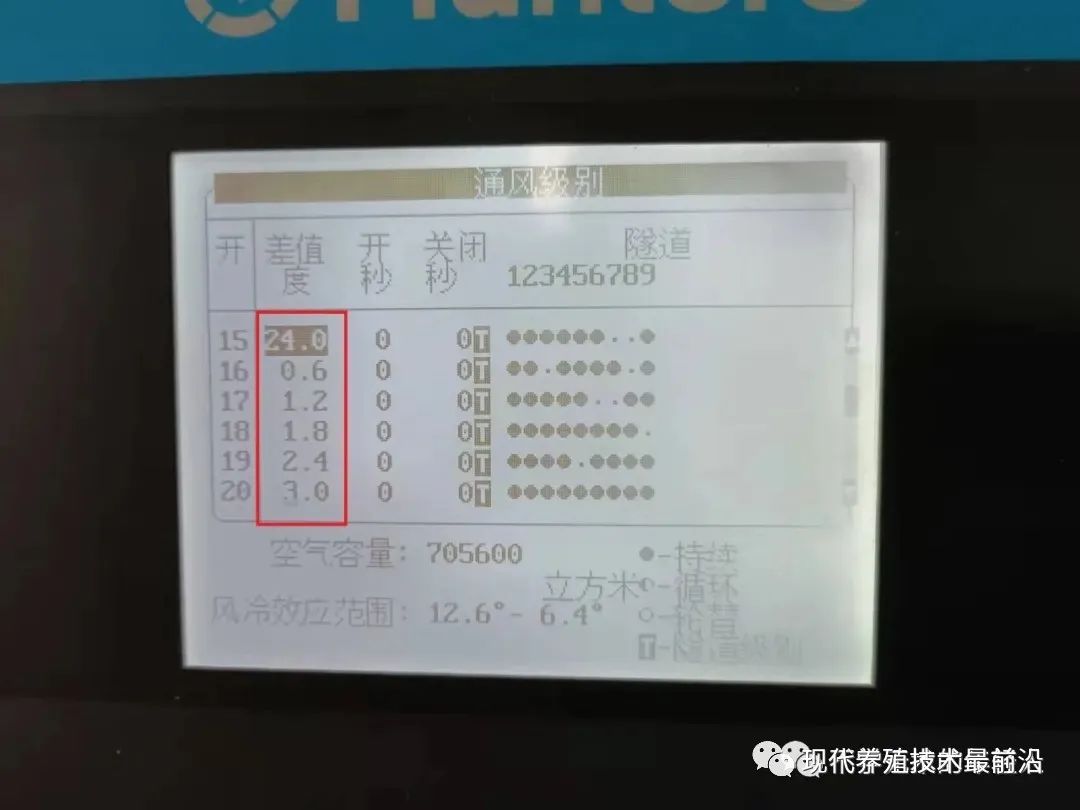
The image above shows the longitudinal ventilation level settings icon. As can be seen, the difference value for level fifteen is 24, indicating that tunnel ventilation mode is entered when the average temperature reaches 24 degrees. This 24 is also the starting temperature for longitudinal ventilation. The difference value for level sixteen is 0.6, indicating that level sixteen operates when the average temperature reaches 24 plus 0.6 degrees. As the temperature continues to rise, when the difference reaches 3 degrees—that is, when the average temperature reaches 27 degrees—it operates up to level twenty.
LG800 controller ventilation level settings:
The calculation method for the horizontal ventilation level is the same for the LG800 controller and the AC2000 controller: it is based on the difference between the average temperature and the target temperature. However, after entering vertical ventilation, the vertical ventilation level of the LG800 is calculated by adding the interval temperature to the vertical ventilation start temperature.
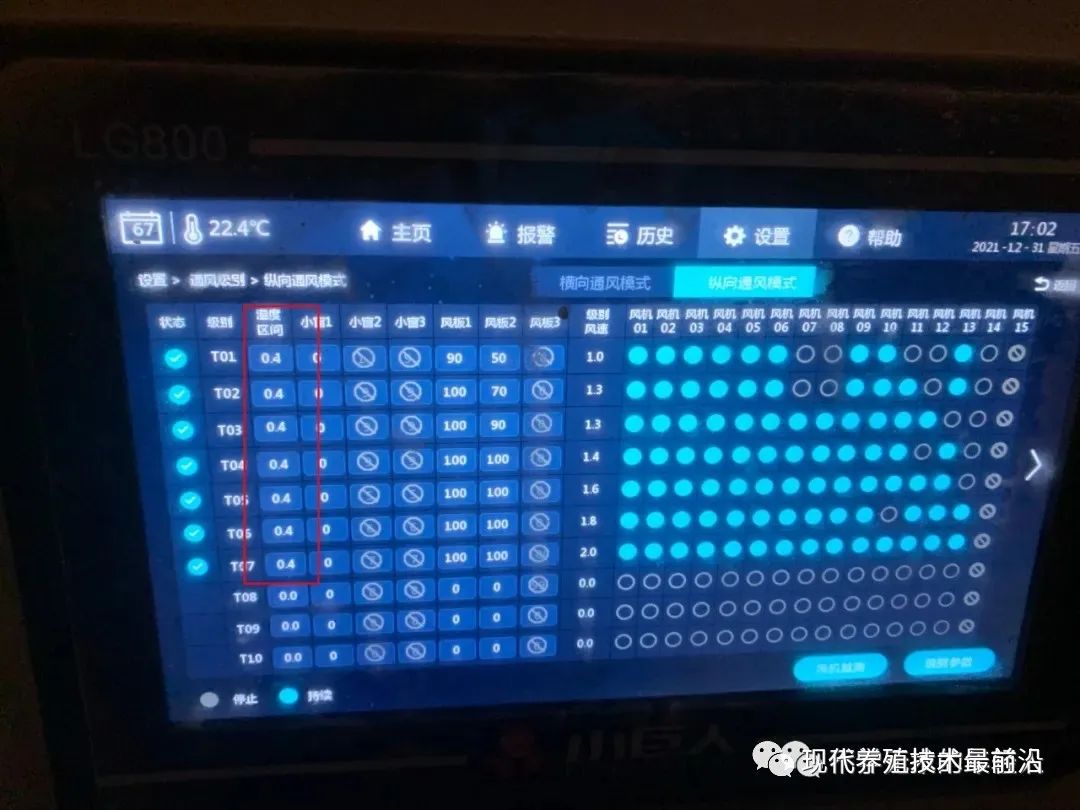
As shown in the figure above, the temperature range for each level of longitudinal ventilation on the LG800 controller, from TI to T7, is 0.4 degrees. Assuming the longitudinal temperature is 24 degrees, the average temperature when operating at level TI is 24.4 degrees. When operating at level T2, it is 24 degrees plus 0.4 plus 0.4, which is 24.8 degrees, and so on. Regardless of the type of ventilation, as long as the fan-level control is known, it is determined by the difference between the average temperature and the target temperature or tunnel temperature. The fan-level control then operates the fan according to the set parameters.
As explained above, the ventilation level is essentially a switching system that controls the number of fans that are switched on and how they operate. Whether the fans run properly directly affects the entire livestock-rearing environment. Therefore, during daily use, pay attention to fan operation and deal with any problems promptly. Regularly clean dust and feathers from the temperature probes, fan safety guards, blades, and butterfly doors to avoid affecting the proper operation of the environmental control system. During subsequent use, do not change the control parameters arbitrarily. If changes are needed, make them under the guidance of a professional to avoid losses.
Note: The settings parameters above are provided for instructional purposes only and are not related to the actual settings parameters. Thank you for reading.